How AI Can Fix a Messy Instagram Grid (And Why We Built It Into PlanYourFeed)
You’ve spent an hour rearranging your Instagram grid. You swap two posts, squint at the screen, swap them back, try a different combination. Something still feels off, but you can’t pinpoint what.
This is the problem we kept hearing from creators: “I know my grid doesn’t look right, but I don’t know how to fix it.” Rearranging posts is easy. Knowing which rearrangement actually improves the feed is the hard part.
That’s why we built AI directly into PlanYourFeed.
The Problem With Planning by Eye
Most feed planners give you a grid and let you drag posts around. That’s useful, but it still leaves the hardest decision to you: does this layout actually work?
Human eyes are great at noticing when something looks wrong, but not always great at diagnosing why. Common issues that are hard to spot manually:
- Color clustering: too many similar-toned images grouped together, creating a dull patch in your grid.
- Content repetition: three selfies in a row, or five product shots without a break.
- Visual weight imbalance: one side of your grid feels heavy while the other feels empty.
- Weak carousel hooks: your first slide doesn’t stand out enough to make people swipe.
You might eventually figure these out through trial and error. Or you could get specific, actionable feedback in seconds.
How AI Feed Optimization Works
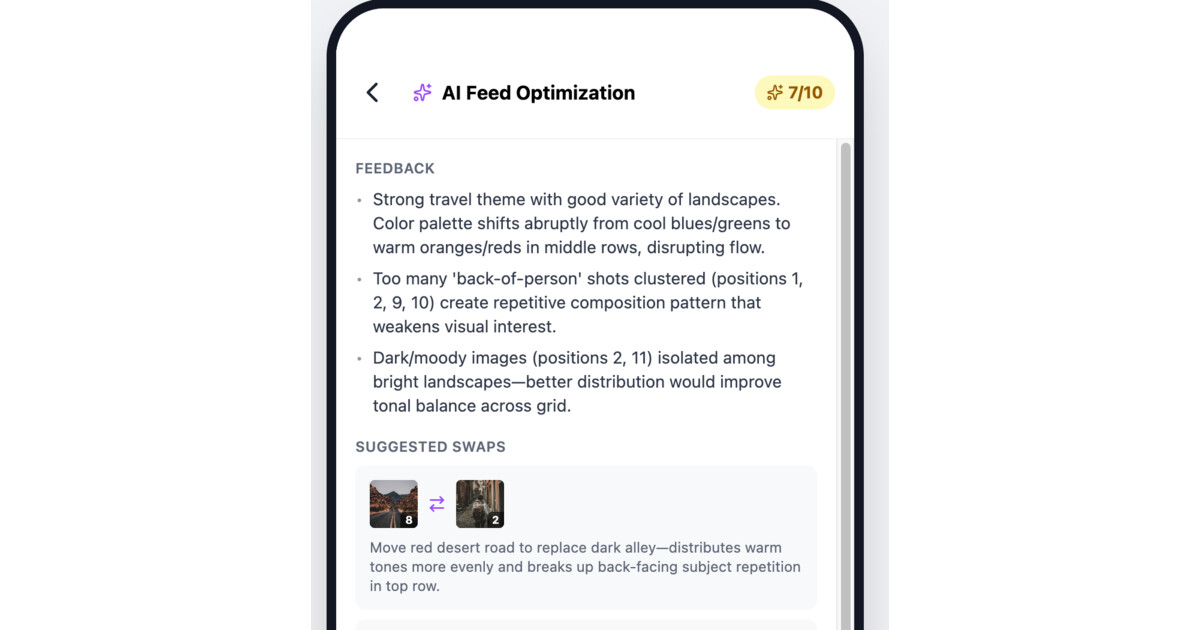
When you tap the AI button in PlanYourFeed, it analyzes your entire grid layout and gives you:
An engagement score (0–10) that rates your current layout based on visual flow, color balance, content variety, and overall cohesion.
Specific feedback explaining what’s working and what isn’t. Not vague advice like “try different colors” — actual observations like “posts 3 and 4 are both dark close-ups; separating them would improve visual rhythm.”
Suggested swaps with reasons. The AI might suggest swapping post 2 with post 7 because it creates better color alternation, or moving a bright image to break up a cluster of muted tones.
You’re always in control. The AI suggests; you decide. And since you’re already in a drag-and-drop planner, acting on the suggestions takes seconds.
AI Caption Generation
Writing captions is one of the most time-consuming parts of posting on Instagram. You have the photo ready, but then you stare at a blank text box for 20 minutes.
PlanYourFeed’s AI caption generator analyzes your image and produces three caption options. They’re not generic templates — they’re based on what’s actually in your photo. Upload a shot from a coffee shop and you’ll get captions that reference the setting, the mood, the vibe.
Pick one as-is, use it as a starting point, or mix and match ideas from all three. The point is to get past the blank-page problem and into editing mode, which is always faster than writing from scratch.
AI Carousel Ordering
Carousels are one of the highest-engagement formats on Instagram, but slide order matters more than most people think. The first slide is your hook — it determines whether someone swipes at all. The middle slides need to maintain momentum. The last slide is your closer.
PlanYourFeed’s carousel optimizer analyzes your slides and suggests the best ordering for engagement. It considers:
- Which image works best as a hook — the scroll-stopping first impression.
- How to build a visual sequence that keeps people swiping.
- Where to place your strongest content for maximum impact.
Like feed optimization, you get a score, specific feedback, and a suggested order. One tap to review, then rearrange if you agree.
What AI Doesn’t Replace
We’re not trying to automate your creative process. AI can’t tell you what to post, what your brand voice should sound like, or what story you want to tell.
What it can do is handle the analytical work that’s hard to do by eye: evaluating color patterns across a grid, identifying repetition you might miss, generating caption starting points so you’re not staring at a blank screen.
Think of it as a second pair of eyes that happens to be very good at pattern recognition.
How to Get Started
AI features are available on PlanYourFeed’s Pro plan (25 uses per month). Here’s how to try each one:
- Feed optimization: add at least 2 posts to your grid, then tap the sparkle icon in the header.
- Caption generation: open the post editor and tap “Generate with AI” below the caption field.
- Carousel ordering: add 2+ slides to a post, then tap “Optimize order with AI.”
All three work the same way: you see the AI’s suggestion, decide if you agree, and apply the changes with a tap. No learning curve, no complex settings.
Try it free — no credit card required.